
Close Menu
  • Home
  • AI News
  • AI Tools
  • AI & Business
  • AI in Academics
  • Dev & AI
  • Automation
  • Productivity Hacks
  • Future of AI
What's Hot

What Is Google AI Mode? A Deep Dive for 2025

August 27, 2025

Download Udemy Courses Free – 5 Ways to Access Courses

June 8, 2025

ChatGPT’s New Advanced and Innovative Feature

April 26, 2025
Facebook X (Twitter) Instagram
Trending
  • What Is Google AI Mode? A Deep Dive for 2025
  • Download Udemy Courses Free – 5 Ways to Access Courses
  • ChatGPT’s New Advanced and Innovative Feature
  • Manus AI vs. the World – Is China’s Autonomous AI the Future?
  • AI Trends 2025: The Ultimate Guide to Next-Gen AI Power Hacks
  • How to Create Videos with Canva AI? Generate AI Videos for Free
  • AirHelp+ Review 2025: Is It Worth It for Frequent Flyers?
  • Wise vs Revolut: Which One is Best Money Managing App?
Facebook X (Twitter) Instagram
AI Power HacksAI Power Hacks
  • Home
  • AI News
  • AI Tools
  • AI & Business
  • AI in Academics
  • Dev & AI
  • Automation
  • Productivity Hacks
  • Future of AI
AI Power HacksAI Power Hacks
Home How to Create Videos with Canva AI? Generate AI Videos for Free

How to Create Videos with Canva AI? Generate AI Videos for Free

Naeem Ur RehmanBy Naeem Ur RehmanApril 23, 20251 Comment3 Mins Read104 Views
Share Facebook Twitter Pinterest LinkedIn Tumblr Reddit Telegram Email
How to Create Videos with Canva AI? Generate AI Videos for Free
Share
Facebook Twitter LinkedIn Pinterest Email

Canva is a widely popular online graphic design tool. It offers various features that allow users to create presentations, postcards, social media graphics, and all types of other designed content. In addition to its graphic design tools, Canva also provides users with the ability to edit videos online. Recently, Canva has integrated AI-powered features for generating images and videos. In this blog, I will guide you on how to create videos using Canva AI.

Canva is available in both free and premium versions. The AI video generation feature is exclusive to premium users. If you don’t have a premium account yet, you may be able to access it for free by using your organizational email.

What is Canva?

Canva is an Australian multinational software company. It offers a user-friendly graphic design platform online. It was launched in 2013 to provide tools for creating social media graphics, presentations, postcards, promotional materials, and websites. Designed for both individuals and businesses, Canva simplifies the design process with its drag-and-drop interface.

Over the years, Canva has expanded its services to include a print product platform and a video editing tool, making it a versatile solution for a wide range of design needs.

Follow these steps to create an account and generate AI videos:

Create a Free Premium Account on Canva to Create Videos with Canva AI

To create an account on Canva, go to canva.com and click on the Sign Up button in the upper right corner, as shown in the attached screenshot. After clicking the Sign Up button, a form will appear on your screen. You will be given five different ways to create an account on Canva, including signing up with Google, Facebook, email, or your organizational email.
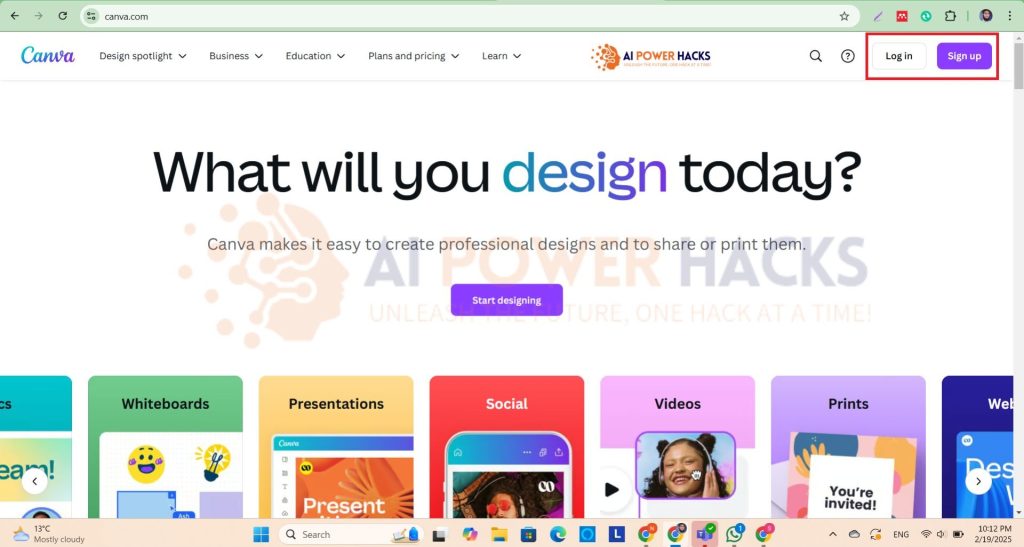
From there, you have to select the ‘Sign up with your work email’ option. Canva.com will ask you to provide your work email, and if you enter your university email, it will send an OTP to that email. You must verify your email by entering the OTP in the system. This will create a free premium account for you to use on Canva.

After completing this signup process, this is the time to create an AI generated video in just a few seconds.

Steps to Create Videos with Canva AI

Please follow these steps to generate an AI Video for you:

1. Select a Video Size from Canva Dashboard

On the Canva dashboard, you will see various size options based on the category names in which your graphic design falls. You need to select ‘Video,’ and from there, choose the platform for which you are creating the video. This will open a blank white page of the same size you selected.
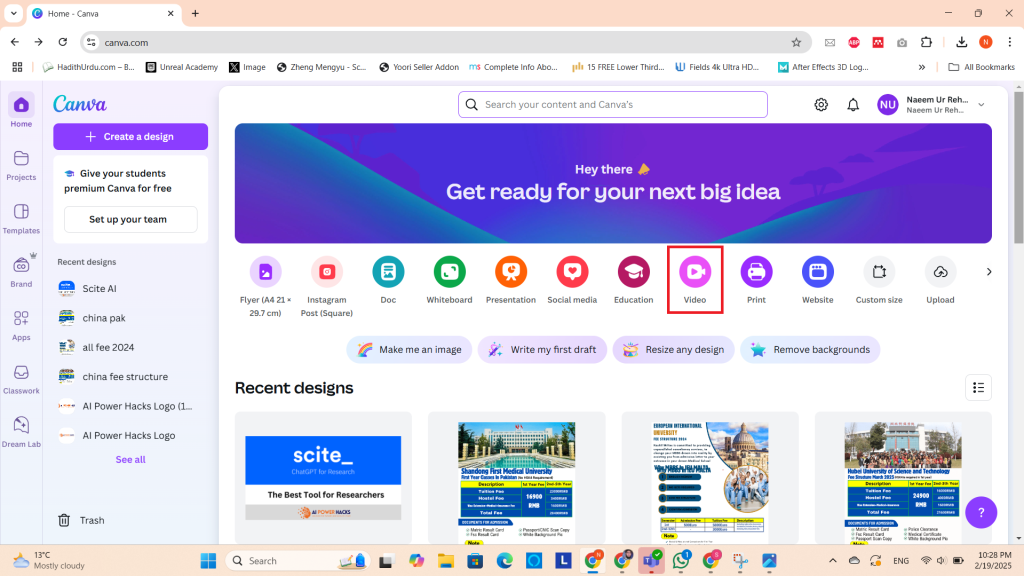
How to select Video dimensions from Canva

On the left-side menu bar, select the Magic Media option, then go to Videos, as shown in the screenshot below. Canva will ask you to provide a plot for the video. You need to describe what you want in your video. You can use Google, ChatGPT, or other content generation tools to find an idea for your video. After clicking Generate Video, a perfectly AI-generated video will be ready for you to download.
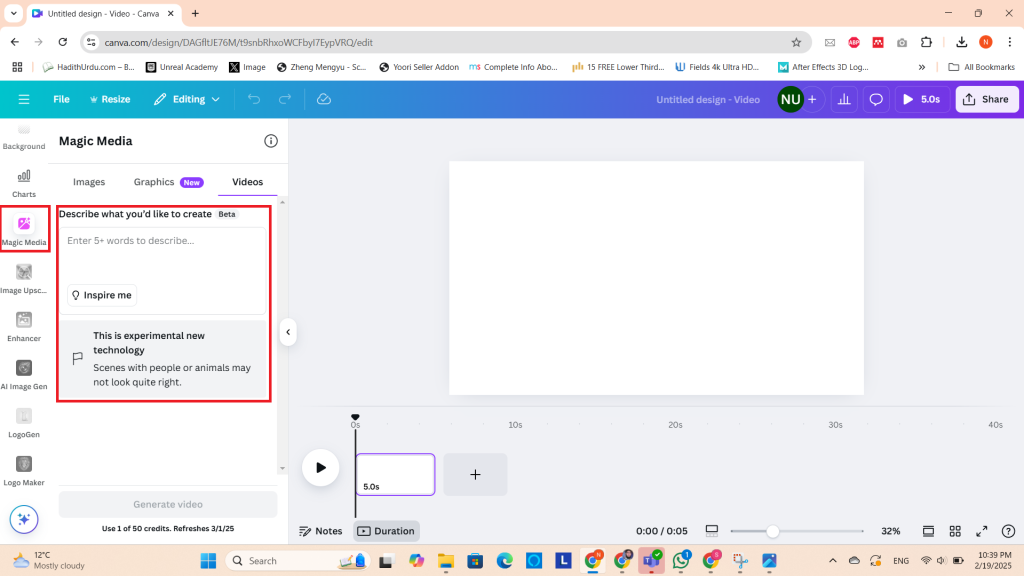
Generate AI Video using Canva

If you have any difficulty generating an AI video from Canva at any step, you can contact me in the comments, and I will help you. If you like this guide, be sure to share it with your family and friends.

Share. Facebook Twitter Pinterest LinkedIn Tumblr Email
Previous ArticleAirHelp+ Review 2025: Is It Worth It for Frequent Flyers?
Next Article AI Trends 2025: The Ultimate Guide to Next-Gen AI Power Hacks
Naeem Ur Rehman
  • Website

View 1 Comment

1 Comment

  1. Pingback: How To Get Canva Pro For FREE in 2025 - An Ultimate Solution - Raabta

Leave A Reply Cancel Reply

Top Posts

Midjourney Free – Explore AI Art Free of Cost

March 15, 20251,251K Views

How to Write an Exceptional Statement of Purpose Using AI

February 22, 2025136K Views

Download Udemy Courses Free – 5 Ways to Access Courses

June 8, 202546K Views

Manus AI vs. the World – Is China’s Autonomous AI the Future?

April 23, 202532K Views

AirHelp+ Review 2025: Is It Worth It for Frequent Flyers?

April 22, 20259K Views
About Us

AIpowerhacks.com is your guide to practical AI tools and tips for boosting productivity and innovation. We simplify AI for everyone, from beginners to tech enthusiasts. It will help you stay ahead in the fast-evolving world of technology. Explore smart hacks and trends to transform the way you work and live!

Join us to make AI accessible and actionable for all! Whether you’re a professional, student, or curious learner, we’re here to help you harness the power of AI effortlessly.

Most Popular

Midjourney Free – Explore AI Art Free of Cost

March 15, 20251,251K Views

How to Write an Exceptional Statement of Purpose Using AI

February 22, 2025136K Views

Download Udemy Courses Free – 5 Ways to Access Courses

June 8, 202546K Views
Our Picks

What Is Google AI Mode? A Deep Dive for 2025

August 27, 2025

Download Udemy Courses Free – 5 Ways to Access Courses

June 8, 2025

ChatGPT’s New Advanced and Innovative Feature

April 26, 2025
© 2026 AI Power Hacks. Designed by Naeem Ur Rehman.
  • Home
  • AI News
  • AI Tools
  • AI & Business
  • AI in Academics
  • Dev & AI
  • Automation
  • Productivity Hacks
  • Future of AI

Type above and press Enter to search. Press Esc to cancel.